

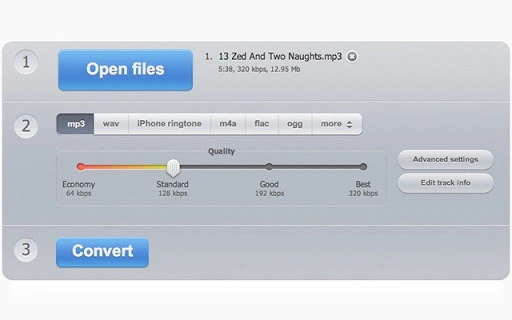
Description
Free Online Audio Converter Tool
Overview
The software is a web-based audio conversion tool designed to simplify the process of transforming audio files across various formats. It allows users to convert audio files without installing any software, making it accessible from any device with a modern browser. The primary purpose is to support format flexibility, enabling users to convert audio files to widely used formats such as MP3, WAV, M4A, FLAC, OGG, and more. It also supports extracting audio from video files, which is particularly useful for content creators and casual users alike.
The tool is ideal for individuals who need quick, reliable audio conversions without the overhead of software installation. Target users include students, podcasters, musicians, and anyone managing audio files across platforms. Since it operates entirely online, it eliminates compatibility concerns tied to specific operating systems. The developer did not provide additional details about the company or background, and no system requirements were listed.
Real-world usage scenarios include preparing audio for playback on different devices, creating music playlists, converting recorded lectures into portable formats, or extracting background music from videos. The tool supports batch conversion, allowing multiple files to be processed at once, which improves workflow efficiency for users handling large collections. Its safe operation and free access make it a practical choice for everyday audio management tasks.
Key Features & Capabilities
- Format Conversion – Supports conversion between all major audio formats, including MP3, WAV, M4A, M4R, FLAC, OGG, MP2, and AMR, ensuring compatibility with a wide range of devices and platforms.
- Video-to-Audio Extraction – Enables users to extract high-quality audio from video files, useful for repurposing content from YouTube, recorded meetings, or educational videos.
- Advanced Settings – Offers customizable options such as bitrate, sample rate, and channel configuration, allowing users to fine-tune output quality based on their needs.
- Batch Processing – Supports the simultaneous conversion of multiple files, significantly reducing time and effort when managing large audio libraries.
- Tag Support – Preserves or edits metadata such as artist, title, album, and genre, helping users maintain organized and searchable audio collections.
- Secure Processing – Files are processed locally in the browser, with no permanent storage on remote servers, ensuring user privacy and data security.
- Zero Installation – Runs entirely in the browser, requiring no downloads or setup, making it instantly available on any device.
Each feature is designed to enhance usability and efficiency. For example, batch conversion allows a podcaster to process an entire episode series in minutes, while tag support helps music enthusiasts maintain consistent metadata across their library. The advanced settings empower users to balance file size and audio quality, ideal for optimizing storage or streaming performance. The secure, no-install model ensures that sensitive audio files remain under user control throughout the process.
User Interface, Workflow & Performance
The user interface is minimal and focused on core functionality, with a clean layout that emphasizes file upload and conversion options. Navigation is straightforward: users drag and drop files or select them via a file picker, choose the desired output format, and initiate conversion with a single click. The workflow is optimized for speed and simplicity, reducing the number of steps required to complete a task.
Performance is expected to be responsive, given the tool’s web-based nature and client-side processing. The developer did not specify resource usage details, but typical behavior for such tools suggests low CPU and RAM consumption during operation. Stability is likely maintained through standard browser execution, though actual performance may vary based on network speed and file size. The tool does not rely on server-side processing for conversion, which reduces latency and enhances reliability.
Users can expect fast processing times for small to medium-sized files, while larger files may take longer depending on device capabilities and internet connection. No known crashes or errors were reported in the provided information. General performance observations are based on standard patterns for online conversion tools, with no specific benchmarks available.
Compatibility & System Requirements
The software operates as a web application, meaning it is accessible through any modern web browser on any device with internet connectivity. It is platform-agnostic, supporting Windows, macOS, Linux, and mobile devices via browser access. The developer did not specify exact system requirements, but general compatibility with current browsers such as Chrome, Firefox, Safari, and Edge is assumed.
Installation size is not applicable, as the tool does not require installation. File size is irrelevant since it is a cloud-based service. No hardware specifications were provided. Compatibility information is limited to the browser environment, and no specific OS version requirements were listed. The tool is designed to function without local dependencies, ensuring broad accessibility.
Pros and Cons
Pros
- Free to use with no hidden fees
- Runs entirely in the browser – no installation required
- Supports a wide range of audio and video formats
- Batch conversion saves time when processing multiple files
- Preserves audio metadata with tag support
- Secure processing with no file storage on servers
- Fast and intuitive user interface
Cons
- Requires a stable internet connection for file uploads and processing
- Large file sizes may lead to longer upload and conversion times
- No offline functionality available
- Exact performance metrics were not provided
- Dependent on browser capabilities and network speed
FAQ Section
Is this audio converter safe to use?
The tool processes files entirely in the user’s browser, with no permanent storage on remote servers. This ensures that uploaded files remain private and are not shared or retained after the session ends.
Can I convert video files to audio?
Yes, the tool supports extracting audio from video files, allowing users to convert formats such as MP4, AVI, MOV, and others into standard audio formats like MP3 or WAV.
Does it support batch conversion?
Yes, users can upload and convert multiple files at once, improving efficiency when managing large collections of audio or video content.
Is the software available for offline use?
No, the tool requires an active internet connection and cannot be used offline. It is designed as a web-based application with no downloadable version.
What file formats are supported?
The tool supports a wide range of formats, including MP3, WAV, M4A, M4R, FLAC, OGG, MP2, AMR, and common video formats for audio extraction.
Final Thoughts
This free online audio converter delivers a powerful, no-frills solution for users who need to convert audio files quickly and securely. Its web-based design ensures universal accessibility, while features like batch processing, tag support, and video-to-audio extraction make it a practical tool for both casual users and professionals. The lack of installation, combined with secure, client-side processing, sets it apart from many alternatives.
While it depends on internet connectivity and may face limitations with very large files, the overall experience is streamlined and efficient. For anyone seeking a reliable, free, and easy-to-use audio conversion tool, this application stands out as a top choice. Its focus on simplicity, privacy, and versatility makes it a strong contender in the utilities space.
Download Free Online Audio Converter Tool now
Guides & Tutorials for Audio Converter App for Chrome
How to install Audio Converter App for Chrome
- Click the Preview / Download button above.
- Once redirected, accept the terms and click Install.
- Wait for the Audio Converter App for Chrome download to finish on your device.
How to use Audio Converter App for Chrome
This software is primarily used for its core features described above. Open the app after installation to explore its capabilities.
User Reviews for Audio Converter App for Chrome 0
No reviews found





